RODE Caster Pro II Back Channel Mode
Back Channel Mode
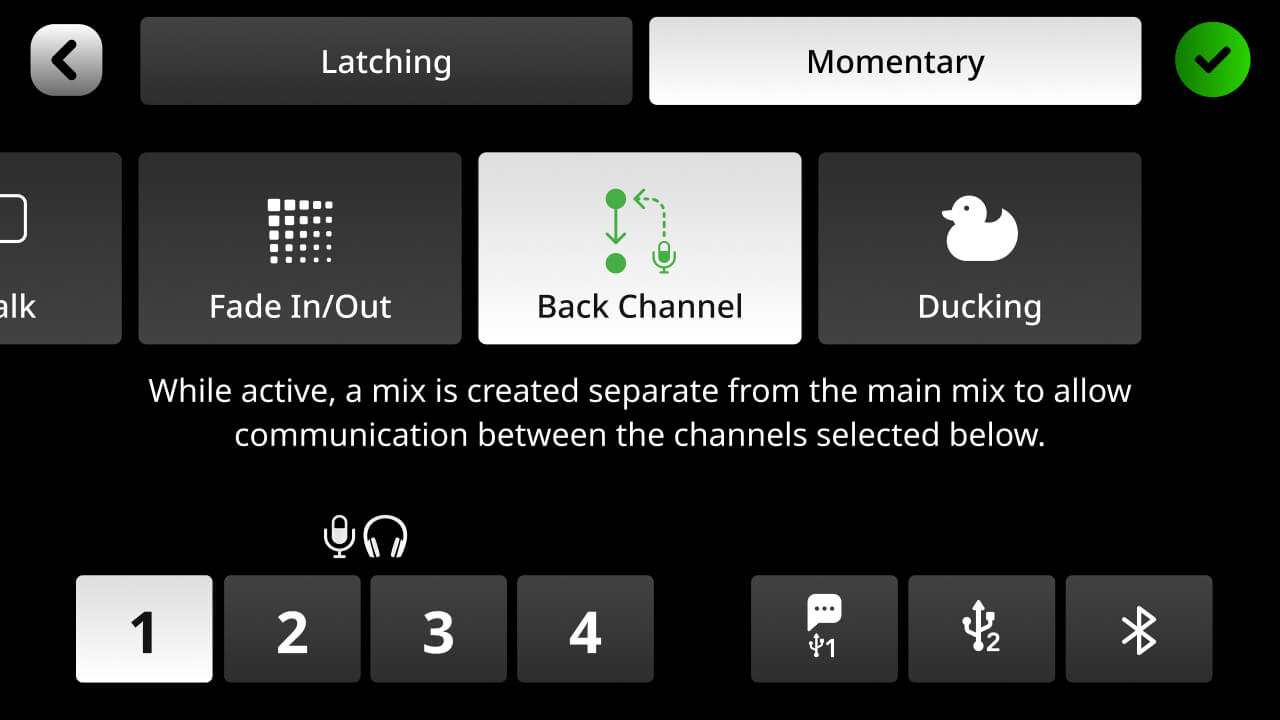
‘Back Channel’ allows you to set up a communications link between audio sources that will not be recorded. This means, for example, the host can communicate with a remote guest prior to introducing them, or all the participants can talk to each other to discuss the next segment whilst other audio is playing. Use the icons at the bottom of the screen to select which sources will be a part of the communication channel. It can be just two sources, or it can be multiple. When the pad is activated, any source linked to the communications channel will have their output muted (so they will no longer be a part of the recording or livestream), and the ‘Listen’ and ‘Mute’ buttons will glow yellow to indicate they can communicate with each other. The pad mode can be set at the top of the screen. In ‘Latching’ mode, the ‘Back Channel’ function will start when the pad is pressed and stop when the pad is pressed again. In ‘Momentary’ mode, the ‘Back Channel’ function will only be enabled whilst the pad is pressed.
Pino Roots & The Midnite Blues © 2026 | Music Lab Learning & Self-Study Archive!


Comentarios
Publicar un comentario