RODE Caster Pro II Custom Routing for the USB Outputs
Custom Routing for the USB Outputs
As mentioned, by default, the main audio mix will be sent to all USB outputs on the RØDECaster Pro II (with mix-minus applied for USB Chat and USB 2).
However, this can be problematic in recording or streaming scenarios where you don’t want a particular audio input being sent to one of the USB outputs, or you want it sent at a different volume level – for example, if you don’t want your game sounds that are being sent to USB 1 being heard on your chat application on USB 2, or you just want them to be heard at a lower volume. To solve this, you can set up a custom sub-mix for USB 1, USB Chat and USB 2, giving you full control over what audio inputs are being sent to each USB outputs and at what levels.
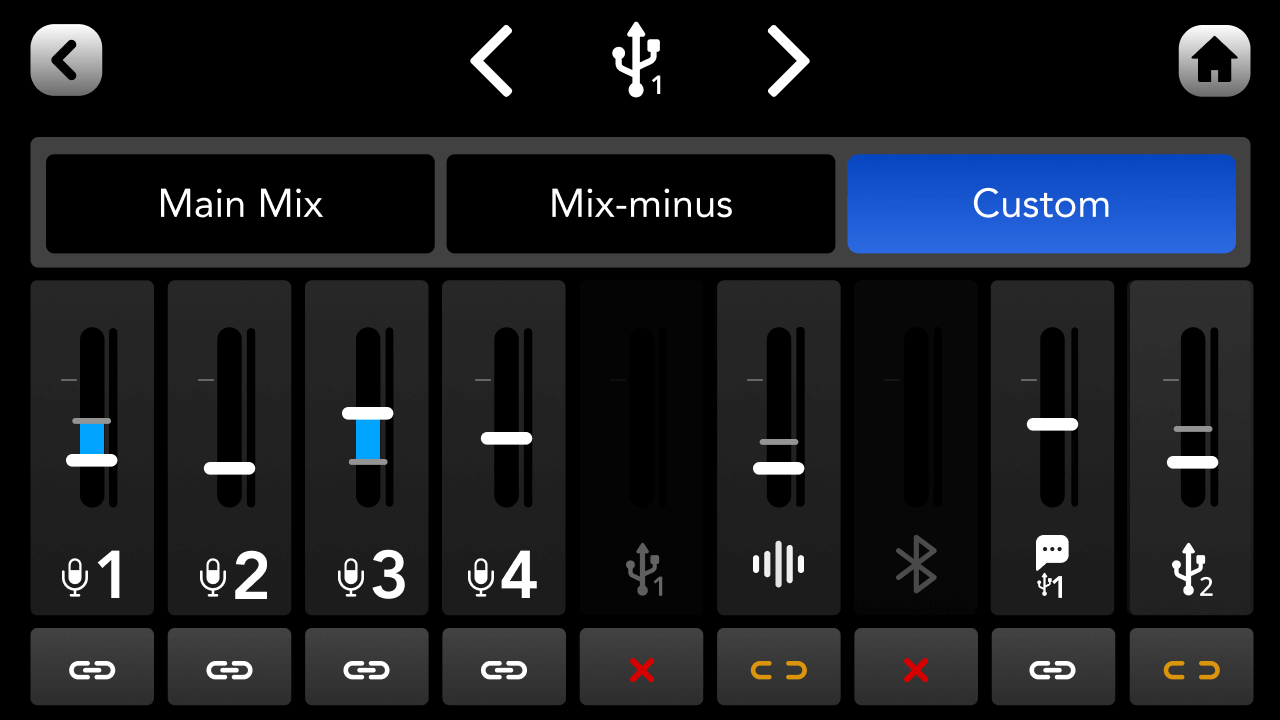
To access this, either go to the channel set-up screen for the USB channel you want to configure and tap ‘Routing’ > ‘Custom’, or go to settings then ‘Outputs’ > ‘Routing’ > ‘Custom’. From the custom routing set-up screen, you can adjust levels, mutes and links for each input track – for more detail on this feature, read the Setting Up Channels and Outputs section of the user guide.
As mentioned, by default, the main audio mix will be sent to all USB outputs on the RØDECaster Pro II (with mix-minus applied for USB Chat and USB 2).
However, this can be problematic in recording or streaming scenarios where you don’t want a particular audio input being sent to one of the USB outputs, or you want it sent at a different volume level – for example, if you don’t want your game sounds that are being sent to USB 1 being heard on your chat application on USB 2, or you just want them to be heard at a lower volume. To solve this, you can set up a custom sub-mix for USB 1, USB Chat and USB 2, giving you full control over what audio inputs are being sent to each USB outputs and at what levels.
To access this, either go to the channel set-up screen for the USB channel you want to configure and tap ‘Routing’ > ‘Custom’, or go to settings then ‘Outputs’ > ‘Routing’ > ‘Custom’. From the custom routing set-up screen, you can adjust levels, mutes and links for each input track – for more detail on this feature, read the Setting Up Channels and Outputs section of the user guide.
Pino Roots & The Midnite Blues © 2026 | Music Lab Learning & Self-Study Archive!


Comentarios
Publicar un comentario