RODE Caster Pro II Loading an Audio File onto a Sound Pad
Loading an Audio File onto a Sound Pad
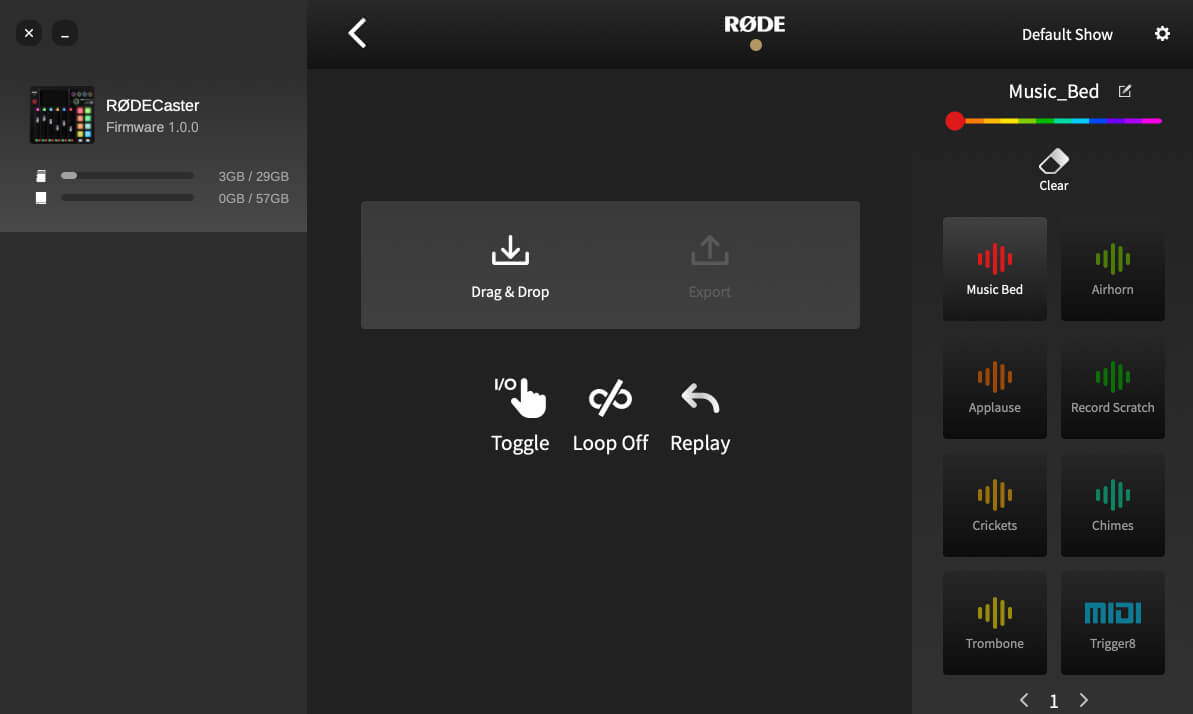
To load a sound onto a pad, click on the target pad. If it is blank or already has a sound loaded on it, you will see ‘Drag & Drop’ and ‘Export’ icons (if it has a different function allocated, you will see an icon for that function – to change this to a sound pad, you must first click the ‘clear’ icon above the list of pads).
Simply drop the audio file from your computer file browser onto the ‘Drag & Drop’ icon to load a sound. The file will be transferred, and the sound allocated to the pad, replacing the existing sound if one was previously loaded.
To load a sound onto a pad, click on the target pad. If it is blank or already has a sound loaded on it, you will see ‘Drag & Drop’ and ‘Export’ icons (if it has a different function allocated, you will see an icon for that function – to change this to a sound pad, you must first click the ‘clear’ icon above the list of pads).
Simply drop the audio file from your computer file browser onto the ‘Drag & Drop’ icon to load a sound. The file will be transferred, and the sound allocated to the pad, replacing the existing sound if one was previously loaded.
Pino Roots & The Midnite Blues © 2026 | Music Lab Learning & Self-Study Archive!


Comentarios
Publicar un comentario