RODE Caster Pro II Reverb
Reverb
Reverb is selected by tapping the reverb icon at the bottom left of the screen. The reverb effect has a range of controls that can be used to modify the effect to taste.
Toggle the effect on and off using the switch on the left. The ‘Low Cut’ and ‘High Cut’ controls can be used to adjust the tonal balance of the reverb.
And the type (or ‘size’) of reverb can be adjusted using the large control on the right. The rotary controls can be adjusted by tapping the control on the screen and then turning the rotary encoder.
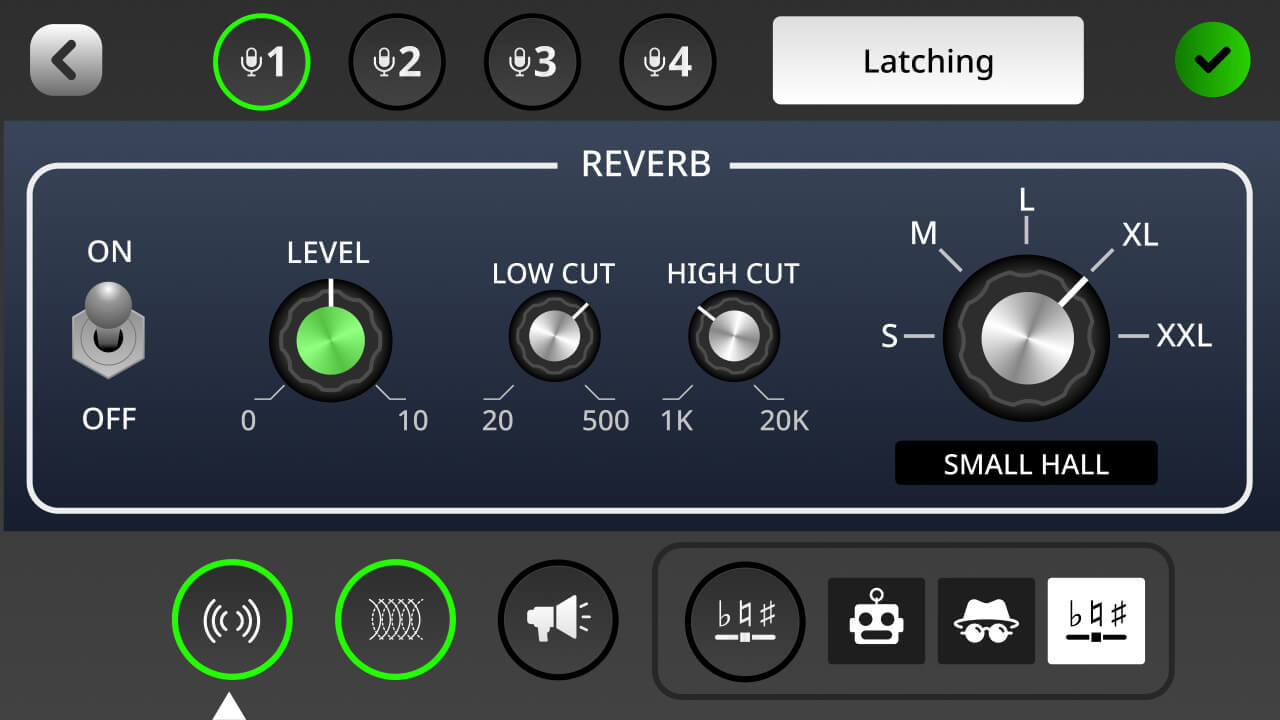
Reverb is selected by tapping the reverb icon at the bottom left of the screen. The reverb effect has a range of controls that can be used to modify the effect to taste.
Toggle the effect on and off using the switch on the left. The ‘Low Cut’ and ‘High Cut’ controls can be used to adjust the tonal balance of the reverb.
And the type (or ‘size’) of reverb can be adjusted using the large control on the right. The rotary controls can be adjusted by tapping the control on the screen and then turning the rotary encoder.
Pino Roots & The Midnite Blues © 2026 | Music Lab Learning & Self-Study Archive!


Comentarios
Publicar un comentario