RODE Caster Pro II Setting Up Channels and Outputs
RODE Caster Pro II Setting Up Channels and Outputs

The Default Mixer Configuration
The RØDECaster Pro II has nine separate inputs for connecting a wide range of devices and audio sources: four combo jacks for connecting microphones, instruments and other devices, two wireless receivers for pairing to compatible RØDE Series IV wireless transmitters (such as the Wireless GO II and Wireless ME), a Bluetooth channel for connecting computers and mobile devices wirelessly, the SMART pad channel, and dual USB-C interfaces for connecting two computers and mobile devices, plus an extra virtual USB channel called ‘Chat’ for connecting chat apps, which is useful for livestreaming and other applications.
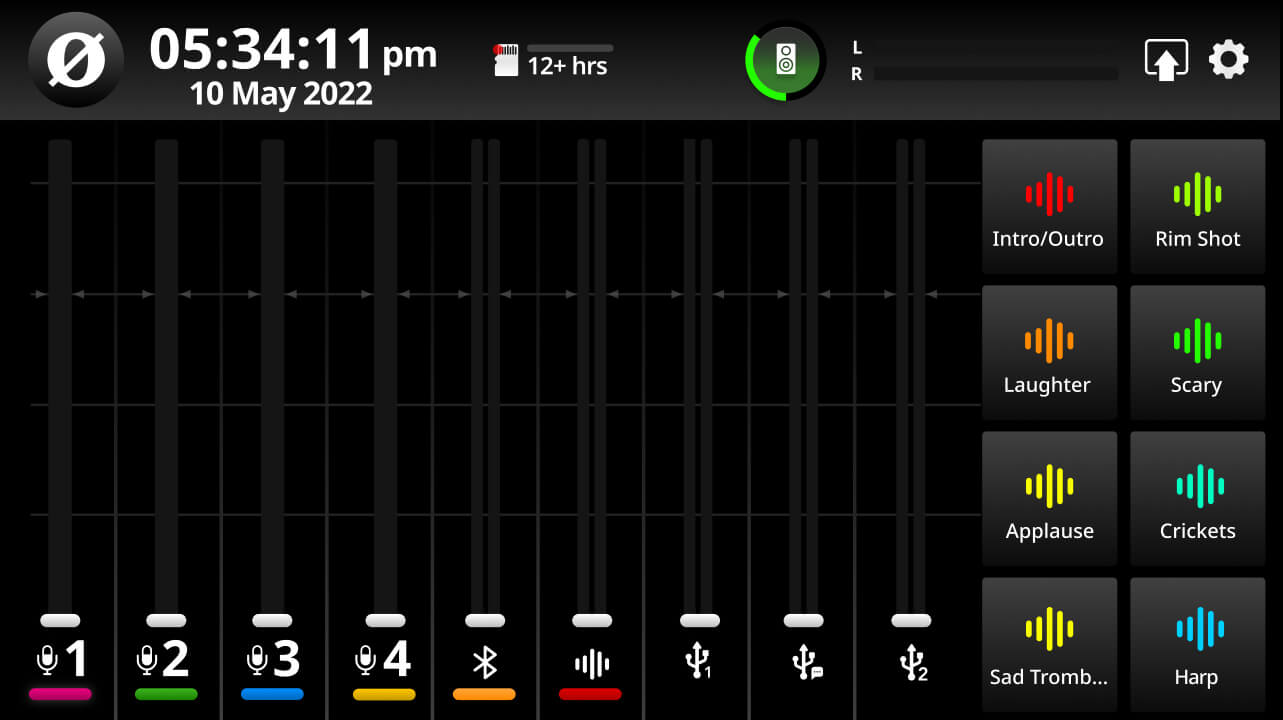
By default, these channels will be assigned to the faders as follows (unless you dictate otherwise during the Setup Wizard process):
Fader 1-4: XLR/TRS Inputs 1-4
Fader 5: Bluetooth
Fader 6: SMART Pads
Fader 7: USB 1
Fader 8: USB 1 Chat
Fader 9: USB 2
The Default Mixer Configuration
The RØDECaster Pro II has nine separate inputs for connecting a wide range of devices and audio sources: four combo jacks for connecting microphones, instruments and other devices, two wireless receivers for pairing to compatible RØDE Series IV wireless transmitters (such as the Wireless GO II and Wireless ME), a Bluetooth channel for connecting computers and mobile devices wirelessly, the SMART pad channel, and dual USB-C interfaces for connecting two computers and mobile devices, plus an extra virtual USB channel called ‘Chat’ for connecting chat apps, which is useful for livestreaming and other applications.
By default, these channels will be assigned to the faders as follows (unless you dictate otherwise during the Setup Wizard process):
Fader 1-4: XLR/TRS Inputs 1-4
Fader 5: Bluetooth
Fader 6: SMART Pads
Fader 7: USB 1
Fader 8: USB 1 Chat
Fader 9: USB 2
Pino Roots & The Midnite Blues & © 2026 | Music Lab Learning & Self-Study Archive!


Comentarios
Publicar un comentario