RODE Caster Pro II Sound Pad Playback Modes
Sound Pad Playback Modes
There are multiple audio playback modes for the sound pads. To access these on the RØDECaster Pro II, tap the target pad from the main screen and then tap ‘Edit’. If you’re using RØDE Central, go to the ‘Customize SMART pads’ screen and click on the pad you want to edit.
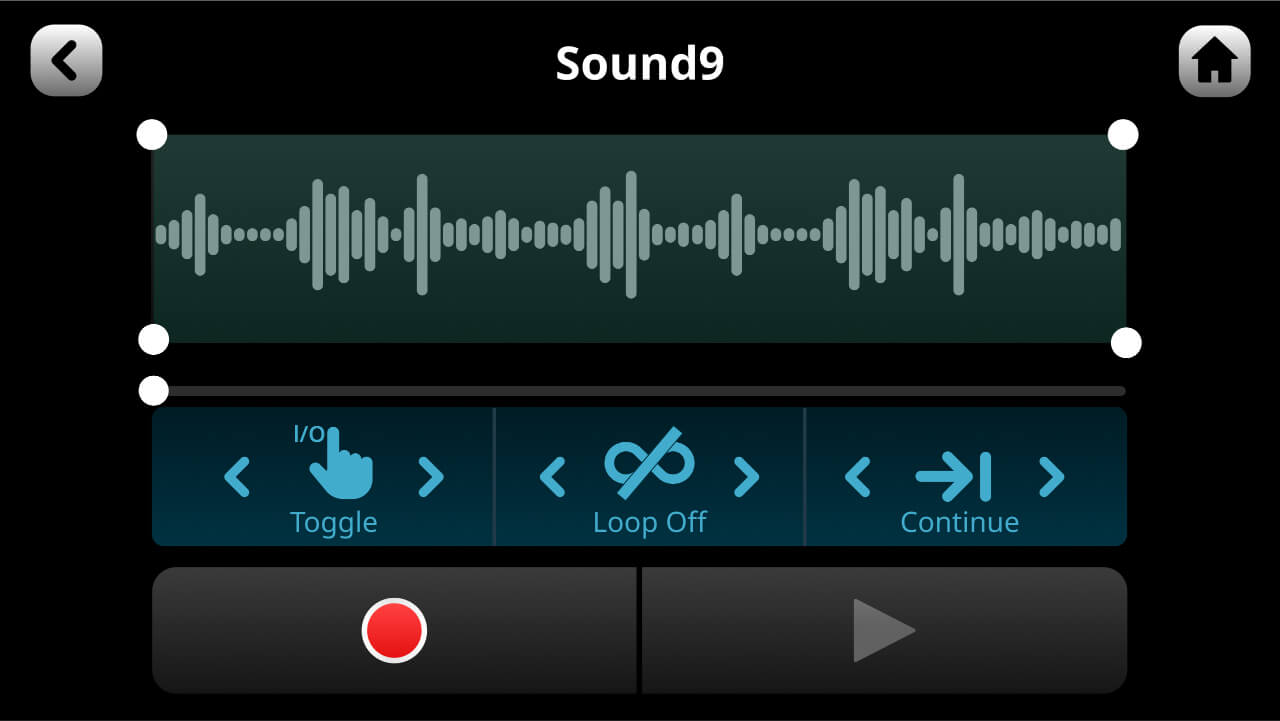
There are three parameters you can adjust:
Toggle/One Shot/Hold: This setting affects how the audio triggers when you press the pad. ‘Toggle’ means one press will start the sound and a second press will stop it. ‘One Shot’ means pressing the pad will play the sound from the beginning – repeated presses will restart playback from the beginning (you cannot force stop playback in this mode – either let the sound play out or fade the sound out manually).
‘Hold’ will play the sound for as long as the pad is pressed.
Loop: In this mode, the audio will play repeatedly in a loop until playback is stopped (this mode is not available in ‘One Shot’ mode).
Replay/Continue: When in ‘Toggle’ mode, this sets whether playback starts from the beginning (if the pad is pressed after being stopped) or resumes from the pause position.
There are multiple audio playback modes for the sound pads. To access these on the RØDECaster Pro II, tap the target pad from the main screen and then tap ‘Edit’. If you’re using RØDE Central, go to the ‘Customize SMART pads’ screen and click on the pad you want to edit.
There are three parameters you can adjust:
Toggle/One Shot/Hold: This setting affects how the audio triggers when you press the pad. ‘Toggle’ means one press will start the sound and a second press will stop it. ‘One Shot’ means pressing the pad will play the sound from the beginning – repeated presses will restart playback from the beginning (you cannot force stop playback in this mode – either let the sound play out or fade the sound out manually).
‘Hold’ will play the sound for as long as the pad is pressed.
Loop: In this mode, the audio will play repeatedly in a loop until playback is stopped (this mode is not available in ‘One Shot’ mode).
Replay/Continue: When in ‘Toggle’ mode, this sets whether playback starts from the beginning (if the pad is pressed after being stopped) or resumes from the pause position.


Comentarios
Publicar un comentario